Latest Posts

Api Documentation 2013-03-04

Why it sucks

Software companies, such as Microsoft, create documentation for millions of topics concerning its APIs, services, and software platforms (MSDN). Creating this documentation comes at a considerable cost and effort. And after all this effort much documentation is rarely consulted (Lethbridge). API documentation is especially difficult to create (Robillard): as just a few writers must create documentation that teaches concepts and that maximally covers the many ways the thousands to millions of developers may be using their API.

Now, the trend may shift even more of the undocumented burden onto developers. The YouTube API recently moved their official developers support from Google Groups to Stack Overflow (Move)— relying on a few thousand questions about the API and on mechanisms of Stack Overflow. And there is no sign in sight that documentation is all the sudden going to get better.

Developers revolt

Instead, developers have been indirectly documenting APIs themselves through a process called crowd documentation, by publishing blog posts and curating questions and answers about APIs. We previously found that even without any inherent coordination, a crowd of Android developers can cover as much as 88% of the API classes in discussions on Stack Overflow.

We collected 1,316 days of Android developer history (average 11 weeks per developer) and we found 9,234 visits to stackoverflow, as well as 2,547 to developer.android.com, which hosts the official documentation for Android. We also analyzed the code examples that could be found in the Stack Overflow data dump and developer.android.com/guide.

In our new study, we find that:

  • Developers may be getting as much as 50% of their documentation from Stack Overflow.
  • More examples can be found on Stack Overflow than the official documentation guide.
  • In web searches, Stack Overflow questions are visited 2x-10x more often than official documentation.

We also found some interesting patterns of web browsing behavior:

  • Developers directly browse official documentation in intermittent bursts.
  • Some developers learn APIs through “apprenticeships” with expert Stack Overflow users.
  • Developers continously reference Stack Overflow questions during development via search.

Programmer Interrupted 2013-01-19

I’m writing this post in an apt state: low-sleep, busy, disorientated, and interrupted. I try all the remedies: Pomodoro, working in coffee shops, headphones, and avoiding work until being distraction free in the late night.

But it is only so long before interruption finds a way to pierce my protective bubble. Like you, I am programmer, interrupted. Unfortunately, our understanding of interruption and remedies for them are not too far from homeopathic cures and bloodletting leeches.

But what is the evidence and what can we do about it? Every few months I still see programmers who are asked to not use headphones during work hours or are interrupted by meetings too frequently but have little defense against these claims. I also fear our declining ability to handle these mental workloads and interruptions as we age.

The costs of interruptions have been studied in office environments. An interrupted task is estimated to take twice as long and contain twice as many errors as uninterrupted tasks (Czerwinski:04). Workers have to work in a fragmented state as 57% of tasks are interrupted (Mark:05).

For programmers, there is less evidence of the effects and prevalence of interruptions. Typically, the number that gets tossed around for getting back into the “zone” is at least 15 minutes after an interruption. Interviews with programmers produce a similiar number (vanSolingen:98). Nevertheless, numerous figures have weighed in: Paul Graham stresses the differences between a maker’s schedule and manager’s schedule. Jason Fried says the office is where we go to get interrupted.

Interruptions of Programmers

Based on a analysis of 10,000 programming sessions recorded from 86 programmers using Eclipse and Visual Studio and a survey of 414 programmers (Parnin:10), we found:

  • A programmer takes between 10-15 minutes to start editing code after resuming work from an interruption.

  • When interrupted during an edit of a method, only 10% of times did a programmer resume work in less than a minute.

  • A programmer is likely to get just one uninterrupted 2-hour session in a day

We also looked at some of the ways programmers coped with interruption:

  • Most sessions programmers navigated to several locations to rebuild context before resuming an edit.

Code Timelines 2012-06-29

Software development isn’t just about the code we write. It also spans the many situations, experiences, and new knowledge we encounter when we write code.

Funny thing is we can’t seem to directly recall or reflect on that stuff very easily. This is no more apparent than we just finished a whole bunch coding and just seem to draw a blank when writing a commit message.

How can we improve a developer’s ability to recall and reflect over recent coding experiences? Can we keep better tally over our activities and even curate and share them?

Timelines

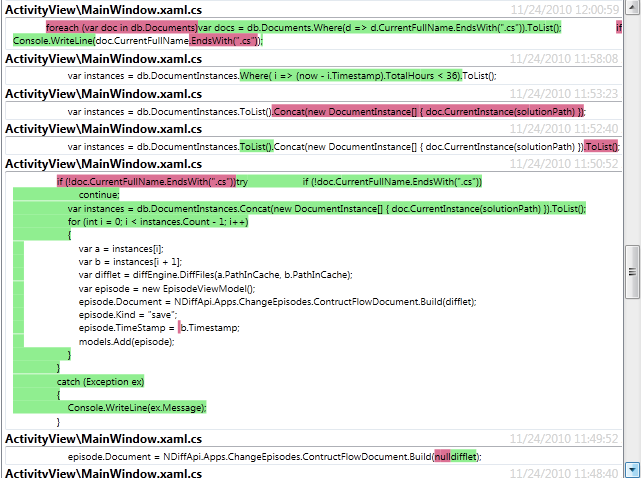
Timeline events include uncaught exceptions:

Collected History

How the system works: Every code change is submitted to a local git repository.
Uncaught exceptions and caught exceptions that hit a breakpoint are logged. Navigation, searches, code copied and pasted from the web are also logged. External data such as SVN/GIT repositories and local browser history are integrated into the history.

Temporally close events are organized into “bubbles”. Each bubble represents an important type of event.

  • A Diff bubble only shows a subset of changed lines by showing the most “interesting” changed lines are selected from the diff (e.g. not an import statement).

  • Exception bubbles show stacktrace information and the site of the exception.

  • Web Visit bubbles show stackoverflow questions that were visited.

  • Commit bubbles show information about a recent commit.

Next steps

  • What other type of event bubbles should there be?
  • What other interfaces would be useful (I also have a calendar with bubbles)?
  • In what different ways would you like to share these types of experiences?
  • Over what time span and level of abstraction would you view events?

Crowd Documentation 2012-05-25

Traditional documentation requires a process where a few people write for many potential users (especially in the case of API documentation). The resulting documentation, more often than not just doesn’t cut it – There aren’t enough examples, details, or explanations.

Crowd documentation turns the traditional documentation process on its head – knowledge is created and curated by a mostly uncoordinated collective. The potential is massive and already happening: stackoverflow.com allows users to ask and answer questions about programming topics, blog posts allow developers to write tutorials and provide solutions to otherwise undocumented issues. StackOverflow already has 3 million questions (with 85% percent answered in a median of 11 minutes) and countless number of blog posts have been written.

But a burning question remains, can we trust crowd documentation? Will it be complete, will it be fast, will it be authoritative? What type of content is created by the crowd and who contributes?

Analyzing API Discussions on Stackoverflow

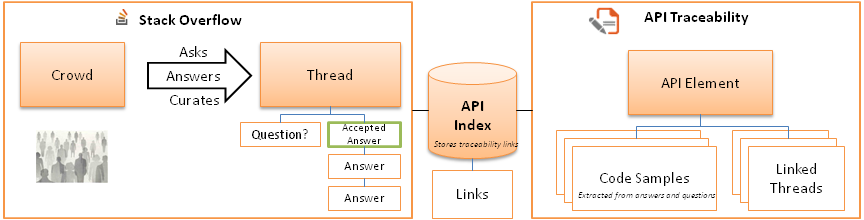
To answer these questions, we obtained a data dump of the StackOverflow database and we measured the amount of discussion of different API elements, such as classes or methods, on StackOverflow.
We wanted to know:

  • Will different API elements be widely covered

  • If an API element is discussed infrequently is it also discussed infrequently in practice

  • How fast is the crowd at covering an entire API

To measure discussion of an API element (focusing on classes), we looked for traceability links in the questions and answer body. We then built a model mapping API elements to the questions and answers via their traceability links. The results surprised us in several ways:

You can find a Stackoverflow thread for a majority of API elements (classes), but the growth of availability occurs only linearly (despite an exponential growth in users contributing). We also found that API elements that were not frequently discussed on StackOverflow were not frequently used in practice (based on numbers we obtained from google code search).

Visualizing API Discussions on Stackoverflow

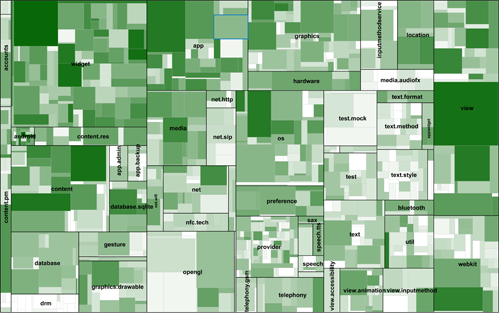
API designers may want insight into the “hot spots” that are problematic for developers or may have “gaps” in coverage. For example, we observed that not many developers talked about accessibility or DRM in Android.

We have a treemap visualization tool that helps visualize the coverage and usage data of API elements in a treemap.

Play with the Android Treemap. Play with the Java Treemap.

Automatically Generating Documentation

Memory 2.0: Attentive Memory 2012-02-29

Continuing my series of posts on cognitive neuroscience of memory. In this post, I first give an overview of attentive memory, some examples of attentive memory failures, and then end with some thoughts on how we might want to support attentive memory in our design of interfaces and tools.

The frontal lobes is the most modern addition to the human brain, providing facilities for planning and reasoning about everyday tasks and social situations.  Within the prefrontal cortex (PFC), lies amazing circuity for maintaining attention on important items during a task.

Attentive Memory

Attentive memory holds conscious memories that can be freely attended to. Within it, goals, plans, and task-relevant items can be sustained for substantial periods of time. Attentive memory is found in the ventrolateral and dorsolateral prefrontal cortex, a region situated in the anterior portion of the brain’s frontal lobe. One theory is that these regions provide the ability to maintain attention on modality-specific specific information such as visual targets in spatial locations or verbal information.

Attentive memory has two complementary operations with corresponding neural mechanisms: focusing and filtering.

Focusing

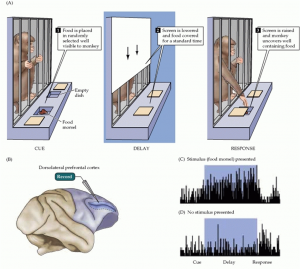
The ability to maintain focus on items has been well studied in the PFC of primates and humans. In early studies of monkey brains, when a food reward was shown to a monkey and then subsequently hidden for a delay period, persistent firing of neurons in the PFC was sustained during the delay period. Despite distracting stimuli, the monkey could recall the location of the food reward. However, monkeys with damage to the PFC could not maintain attention and performed poorly at recalling the location of the food [Fuster 71].

A human equivalent of these monkeys has been found in one patient, Clive Wearing. After a viral infection that destroyed much of his PFC and hippocampus, the patient could no longer attend to any memory longer than 30 seconds [Wearing 2006]. Definitely worth watching the documentaries: part 2a, part 2b,part 2c, part 2d; and more recently: “Man with the 30 second memory”.

Clive’s Diary:

Filtering

Humans can fluidly filter and switch among items in attentive memory using selective attention. Selective attention is the ability to conditionally attend to an item based on its attributes. For example, in a crowded room, attention can be switched from people with red shirts to people with hats. This ability derives from highly plastic neurons that can become tuned sensitize to certain attributes, such as color [Fuster 82]. Selective attention complements our ability to focus on multiple items by allowing distinct groups of items to be attended to. Thus, via selection attention, more items can be concurrently attended given that the items have distinct attributes [Park 2007].

Neural Mechanisms

More recent work has uncovered the underlying mechanisms of attentive memory. When examining the firing patterns of ensembles of neurons, rhythmic oscillations can be observed. These oscillations encode the attributes of an attended item. Siegel and colleagues [Siegel 2009] observed that when multiple items need to be attended to, distinct items were maintained in distinct phase orientations of the oscillating signal. Our limited ability to attend to multiple items are constrained by the speed and space it takes to encode waves within a limited frequency spectrum. An interesting benefit emerging from phase coding of items is the ``free’’ temporal order of those items. In the same experiment, when the order of items were misremembered, there was a correlation with inadequate phase separation of the encoded items: The signal still preserved enough information to represent the items, but not enough information was available to determine their order.

Why We Should Stop Using the Term “Working Memory”